
Without Charterspot
- 247 unread since Friday — and counting
- “Anyone have the recap for MV Nordic Wind?”
- The grain enquiry from Tuesday? Buried on page 4.
- Positions re-keyed into a spreadsheet. Again.

Built for shipping operations
AI agents that organize, analyze, and understand every email in your shipping workflow — fully customized to your needs and requirements.
Why Charterspot
The pipeline
Seven stages, all running live. This is what actually happens to your traffic — with real examples at every step.
Connect
Connect the addresses your desk already uses — as many as you need. Charterspot reads new mail every 60 seconds, attachments included, and files it away neatly. Your team changes nothing.
Classify
A classification agent reads each email and files it into the categories your desk defines — Cargo, Vessel, Time-charter, Bunkers, whatever your workflow needs. Each agent runs your prompt, on your choice of AI model.
Categories are configuration, not code — every desk gets its own set.
Extract
An extraction agent per category pulls out the fields you have defined — typed, cleaned, ready to sort, filter and export. Try it on real traffic (senders hidden):
GD DAY — PLS PROPOSE FRM TONNAGE FOR: 5,000 MT CORN IN BULK SF ABT 48' WOG — ODESSA / MERSIN — PROMPT 20-22 MAR — FRT IDEAS PMT BSS FIOST — END USERS. BRGDS / J.
MV ONEGO ELBE — 11,087 DWT BLT 2010 — SINGLE DECK / BOX — OPEN STO THOMAS 04-14 APR — PLS PROPOSE FIRM CARGOES — TKS / BRGDS
NEED SMX/UMX 50-63K DWT — DELY ECI REDEL WAFR — 1 TCT BAGGED RICE — DUR ABT 70 DAYS — LAYCAN 20-24 MAR — PLS PROPOSE FRM IDEAS
Recirculate
The same cargo is re-sent all day by different brokers — new subjects, new spellings, new tonnages. Deterministic engines group the copies over a rolling window: same input, same answer, every time. You work the market, not the duplicates.
Act
Build saved views from any combination of your fields — nested and/or logic, summarized in plain English as you build. Attach a rule to a filter, and matching emails are forwarded to any mailbox the moment they arrive.
Saved filter: “Black Sea grains, handysize”
Learn
Every company and contact behind your traffic gets a live profile — who sends what, how often, about which routes. No CRM to maintain; it is all derived from the emails themselves.
Illustrative profile — the data comes from your own traffic.
Report
Every morning — your timezone, weekends off — a PDF summarizes what moved in your market: trend charts per route and commodity, an executive read on top. An afternoon edition follows if you want one.
Charts from your own traffic · delivered by email
 Live workspace
Cargoes — grouped view
Live workspace
Cargoes — grouped view
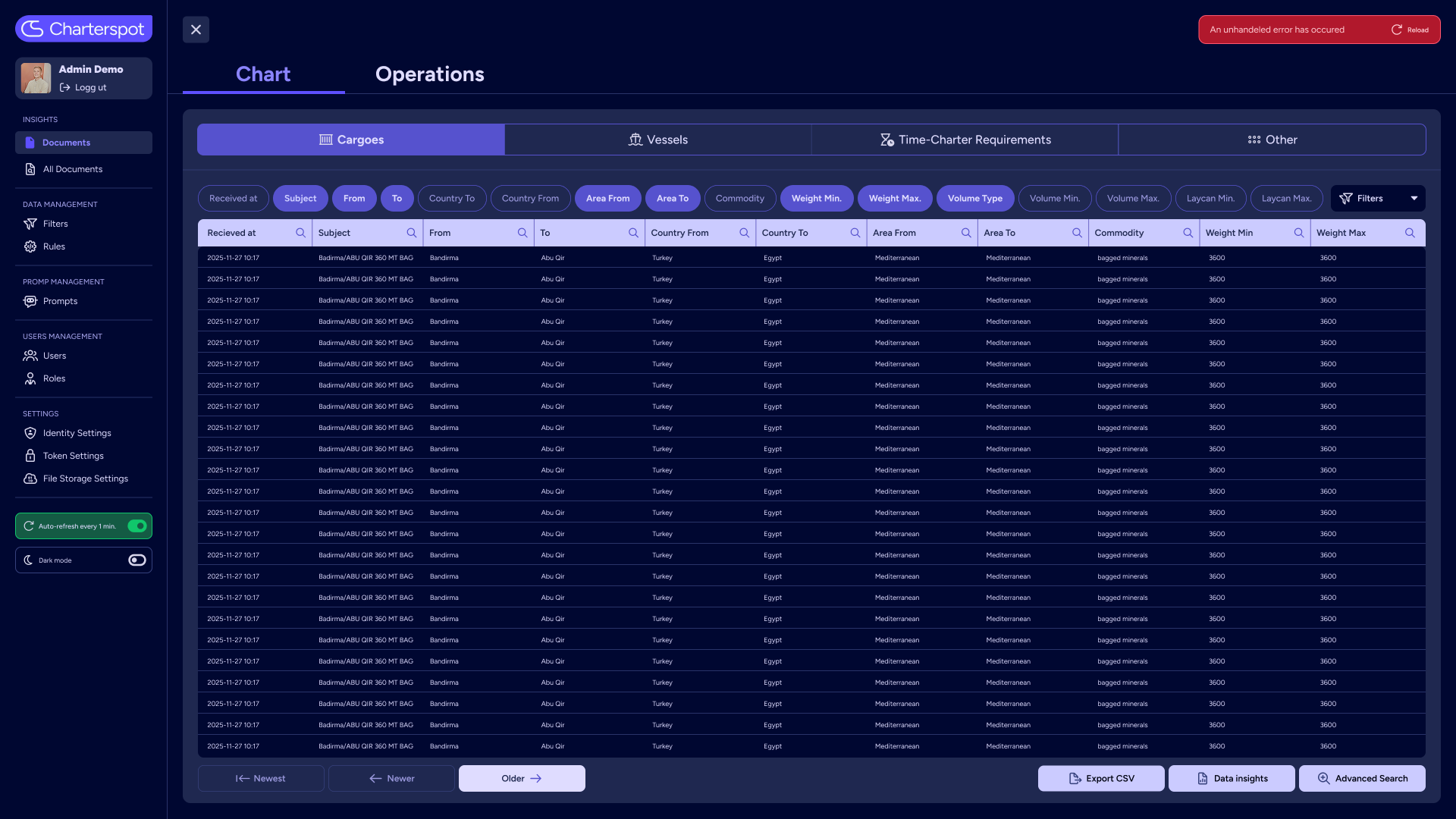
Where it all lands: flip between List and Recirculation, filter any column, open a row to see extracted data next to the original email, export to CSV.
Who it’s for
01 — Desk
02 — Ops
03 — Management
Under the hood
Every stage of the pipeline is configuration, not custom software. A new desk means assembling agents — not writing code.
pipeline — your desk
The agents extract what your desk cares about — defined together with you, adjusted as your workflow evolves.
Each agent runs its own instructions on its own AI model — tuned per category, visible in the app, never a black box.
Background data-quality agents normalize company and contact names and merge duplicates — every change evidence-based and validated before and after.
Customer experiences
Onego runs its chartering inbox through Charterspot. Every email that reaches the desk is categorized, extracted and grouped automatically, the moment it arrives — the team works from structured records instead of digging through an inbox.
Pricing

Each client has unique needs — pricing is tailored accordingly.

Clients cover variable costs such as cloud storage and AI agent usage, plus an annual contract fee.

Contract terms are flexible and can be adjusted to your specific requirements.

Curious? Start with a no-obligation conversation.
Get in touchQuestions
No. Charterspot reads the mailboxes you already use, so your team keeps working exactly as before — they just stop sorting. The structured workspace, reports and network views sit alongside the inbox, ready when you are.
We connect your mailboxes, then shape categories, fields and agents around your workflow together with you. Most of the work happens on our side — for your team it is a handful of working sessions, not a migration.
Your data stays yours. Every customer’s data is kept fully separated and processed in Charterspot’s secure Azure environment, and it is only used to run your own workspace, agents and reports.
No — the agents read and classify emails in the languages your traffic actually arrives in, and the structured output stays consistent either way.
That is the point. Categories, extracted fields, reports and agents are configured per customer — Charterspot adapts to the desk, not the other way around.
Pricing is tailored to each client: variable cloud and AI usage plus an annual contract fee. See pricing above, or get in touch for a no-obligation conversation.